
Every school should digitize documents and embrace a records management system. You're not by yourself in this journey to simplify records management. The agony of searching through filing cabinets for that one transcript from 2019 is well known to all school administrators. However, those times are coming to an end as smart institutions are already making the change.
Let's look at the most important steps you need to take to digitize your student records and make your school's management core less disorganized and more efficient.
Why Your School Needs Digital Student Records Now
The writing's on the wall (or should we say, the pixels are on the screen) in our digital record era. Modern education demands modern solutions, including effective records management and digitization strategies. Digitizing student records isn't just about keeping up with the times. It's about unlocking benefits that make your entire operation run smoother.
Think instant access to any student file, bulletproof security that makes FERPA compliance a breeze, and space savings that'll make your facilities manager do a happy dance. Plus, when parents call asking for records, you're not making them wait while you spelunk through archives.
Step 1: Come Up with a Great Plan
Take a big breath in before you look at anything. The first step in any successful digital project is to plan.
Take a Look at Your Current Situation
Start by giving the problem a lot of thought, particularly in terms of how to simplify the process. Sort the types of files you have into groups, count how many file boxes you have, and be honest about how messy your storage of paper records is right now. In this case, do we mean medical papers, transcripts, admission files, or everything related to student data?
Figure Out How Big Your Job Is
Do not try to digitize documents of the elephant all at once. Make it clear what the project's goals, funds, and plan are, as well as whether it will be a full-on effort or a pilot program. Yourself in the future will be glad you simplified the process and were patient.
Step 2: Get Your Legal Matters in Order
Here's where things get serious. Student records aren't just any old paperwork; they're protected by federal regulations that don't mess around.
FERPA Compliance is Non-Negotiable.
FERPA compliance protects student education records, and digitization doesn't change those rules. You'll need role-based access controls, audit trails, and encryption that would make Fort Knox jealous of your records management system.
Don't Forget HIPAA
Got health records in the mix for your records management system? HIPAA requirements apply to any health-related student information. Layers on those security protocols like your institution's reputation depend on it because it does.
Step 3: Prep Your Documents Like a Boss

Time to get your hands dirty. Document preparation might not be glamorous, but it's the foundation of everything that follows in the records management process.
Clean and Organize Physical Records
Start by removing unnecessary documents; those duplicate forms and outdated disciplinary referrals can hit the recycling bin. Sort everything by category and remove staples that'll jam your scanners faster than you can say "technical difficulties" to ensure efficient digitization of paper documents and records management.
Nail Your Naming Conventions
This is your chance to create order from chaos. Implement standardized file naming conventions using formats like "LastName_FirstName_DateOfBirth" or combine enrollment year with serial numbers. Trust me, your future searches for digital records will be lightning-fast.
Step 4: Choose Your Tech Stack Wisely
Not all scanners are created equal, and your document management system will make or break this whole operation.
Scanner Selection Strategy
Choose appropriate scanning equipment based on your volume and document types. There are flatbed scanners for big files or pictures and high-speed automatic document feeders for smaller files, both essential for effective records management. It's kind of like making sure you have the right tool for the job.
Document Management Software
Your document management system Records management needs to be more than just digital storage. Look for OCR technology that makes everything searchable, integration capabilities with your existing student information systems, and security features that'll keep the compliance folks happy.
Step 5: Execute with Precision
Now comes the main event—actually scanning those documents. But don't just start feeding paper into machines without a plan.
Run Pilot Tests First
Conduct pilot testing with representative samples. Make sure the OCR is accurate, that your printer settings are right (300 DPI is usually best for text files), and that your file formats will last. To keep everything for a long time, PDF/A is recommended for your digital records.
Systematic Scanning Process
Execute systematic scanning in organized batches to simplify the records management process. Keep quality standards consistent by checking scanner calibration regularly, and always verify that all pages are captured and properly oriented.
Step 6: Quality Control That Actually Works
Scanning documents is only half the battle in digitizing documents effectively. Quality control is essential in records management, especially for digitized documents. is what sets professionals apart from beginners.
Set up strict quality assurance procedures. Compare scanned papers to originals to make sure the data is correct. Conduct regular quality reviews throughout the process and address any scanning errors immediately. Maintain audit trails for everything, your compliance team will love you for it, especially in the context of student records automation and records management.
Step 7: Integration and Training
Your shiny new digital system for managing student records is worthless if nobody knows how to use it properly in the education sector.
System Integration
Interface with existing systems like your student information system for seamless data access. Make sure everything plays nice together; compatibility issues are the enemy of efficiency.
Complete Training for Staff
Teach your staff about changes to workflow, security, search tools, and how to navigate the new records management system. Make sure that your workers get full training that covers both the "how" and "why" of new procedures.
How to Scan Student Records Step by Step
Here is the process most schools and vendors follow when they tackle a scan student records project, whether it is handled in house or outsourced.
First, take inventory. Figure out which record types and date ranges actually need converting before a single page of paper records hits the scanner. This saves you from digitizing files nobody will ever need again.
Second, pack and transfer securely. If you are working with an outside vendor, records get boxed and moved to a scanning facility under a proper service agreement. FERPA actually allows this through its school officials exception, which lets vetted contractors handle student data as long as they are performing a function under the school's control, as outlined in this FERPA compliance overview for schools and universities.
Third, scan at a high resolution and run OCR, short for optical character recognition, so the scanned images of educational records become fully searchable text instead of just pretty pictures of paper.
Fourth, index everything in your management system. Tag each file by student, record type, and academic year so staff can pull any digital records up in seconds instead of digging through paper records.
Fifth, upload to a secure, access-controlled repository, cloud-based or on-premise, where the digital archive of student information actually lives long term.
How to Secure Digitized Student Records and Maintain FERPA Compliance
Scanning a paper file does not make its privacy requirements disappear. It just changes what you need to protect in your educational institution. A few practices worth locking in from day one, according to security guidance for storing student records, include encrypting data both at rest and in transit, requiring multi factor authentication for anyone accessing the system, and using role based permissions so only staff with a legitimate reason can view a given file.
Add regular audits of who viewed or edited what, follow the three two one backup rule of three copies across two storage types with one kept off site, and vet any outside vendor's security certifications before you hand over a single box. None of this is optional once personally identifiable student data goes digital, especially under the educational rights and privacy act.
Common Challenges (and How to Avoid Them)
Where to Start When Digitizing School Records
Decades of information and records fill the coffers of many private institutions without there existing any inventory of what lives where or in what state of repair it is. Getting into a digitisation project of such matters without that map is like marching into enemy territory blindfolded.
Conducting an Academic Records Audit Before Digitization
The fix is an audit before anything else. Catalog what you have, prioritize by risk (records most vulnerable to physical loss or most frequently accessed go first), and define your metadata standards before a single page gets scanned.
Creating a Structured Inventory for School Records Digitization
According to digitization best practices from Princeton's Records Management program, a structured inventory and classification scheme is the foundation everything else is built on. Skip it and you're building on sand.
Poor Scan Quality in the Records Digitization Process
Nothing is more demoralizing than putting in a lot of effort on document scanning, only to discover that half of the copies are illegible blurs. When a scanned document's resolution is too low, its page comes slanted, or some of its content is missing, these quality errors compound over time.
Recommended Scanning Standards for Academic Records (DPI, File Formats)
Academic records are intended to be at a minimum 150 to 300 dpi and saved in stable formats such as TIFF or PDF/A.
Quality Control Best Practices for Digitizing School Records
Quality control inspections should occur throughout the steps of the process, rather than waiting until the end. Even with every batch, a sampling review could espouse so many problems such that re-scan readings get completed before six months, and then all the originals get boxed for records retention.
Inconsistent Metadata in Digital School Archives
Here's a scenario: one staff member labels a document "transcript." Another calls it "academic transcript." A third goes rogue and types "Trans 2009 fall." Now your searchable digital archive is as useful as shouting into a filing cabinet.
Why Metadata Standards Matter in Academic Records Digitization
Metadata consistency is everything for effective student information management. Student identifiers, document types, and date formats need to follow a controlled vocabulary that every person touching the student record management project understands and uses.
Creating Controlled Vocabulary for School Records Management
Define it in writing. Make it non-negotiable for effective student record management. ASBO Alberta's Student Records Digitization Toolkit goes deep on classification schemes for exactly this reason because "close enough" metadata isn't metadata, it's chaos with a label that undermines secure record retention.
Staff Resistance to Digitizing School Records
So, you can purchase the best Electronic Document Management System in the market, get it configured appropriately, and train the team carefully. Then watch three people quietly continue emailing scanned PDFs to each other because "that's just how we do it."
How to Improve Staff Adoption of Digital Records Systems
Staff adoption is a culture challenge disguised as a training challenge. The real fix is involving key staff in the system selection process before decisions are made. When people have ownership, they advocate. When they're handed a done deal, they tolerate, at best, especially when understanding why digital records matter in everyday academic workflows.
Training and Change Management in Academic Records Digitization
Why's the need to have champions in place for secure student record management, ruling from within? The latest system must be proven to be easier, not theoretically. Furthermore, the new plan must ensure that instruction is provided before and after going live, not just before.
Digitizing Academic Records Without a Long-Term Digital Archive Strategy
Digitization solves the storage problem. But the schools and universities that get the most value out of it treat it as a starting point, not a finish line.
Turning Digitized School Records into Accessible Digital Archives
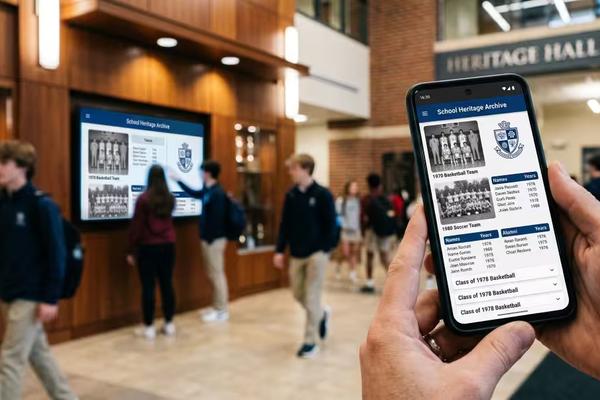
Once your academic records are digital, accessible, and governed, you've unlocked the ability to actually do something with your institution's history. That's where Touchstone Digital Solutions comes in. While your records management system handles the administrative layer, Touchstone's touchscreen software transforms your school's legacy into something worth showing off with properly maintained digital files and insights drawn from best digitization software 2025.
Using Digital Records to Preserve Institutional History
Championships, alumni milestones, donor recognition, and decades of institutional pride can be brought to life on interactive displays accessible from anywhere in the world. Think of it this way: digitization gets your history off the shelf. Touchstone puts it on the wall, and makes it impossible to ignore.
How Digital Student Records Can Become a Living School Archive
Here is the part most digitization guides skip. Once your student records are scanned, organized and secure, you have not just solved a compliance headache. You have unlocked a century of school history that has probably been sitting in a box, unseen, for years.
That is where the opportunity gets interesting. Instead of those digitized archives disappearing into a folder nobody opens, schools are turning historical records, hall of fame moments, alumni achievements and donor recognition into interactive touchscreen displays that visitors, families and students actually engage with. It is the difference between a records database and a living legacy that never graduates.
Older material such as yearbooks, photos and programs can be handled by a professional yearbook scanning service and published in a digital history archive.
To sum up, your digital future is ready for you.
If you follow these steps to digitize student records, your school will no longer be a paper-pushing business but a more streamlined and effective educational powerhouse focused on student data. The benefits, which include faster information retrieval, big cost savings, higher protection of digital records, and better access, grow over time.
At Touchstone Digital Solutions, we've seen firsthand how digital transformation revolutionizes educational institutions. Your university can make a statement by showcasing its accomplishments and expediting administrative tasks with the correct digital strategy and records management system.
Are you prepared to discard your file cabinets and go on to the next project? Your staff, students, and sanity will all appreciate it. The question isn't whether you should digitize; it's how fast you can make it happen.