
Picture a freshman orientation tour, Forty nervous families, and one paper map that’s already fraying. The tour guide keeps acting like she knows a quick passageway, even though she does not. We’ve all had that moment of being the misplaced person in a corridor, staring at a hallway board from 2011, squinting at the labels, trying to deduce where the registrar’s office has vanished to.
That scene is becoming optional. The fix is a campus directory touchscreen, and in 2026 it's quickly turning into the standard, not the upgrade, for intuitive navigation.
What Is an Interactive Campus Directory Touchscreen and How Does It Work?
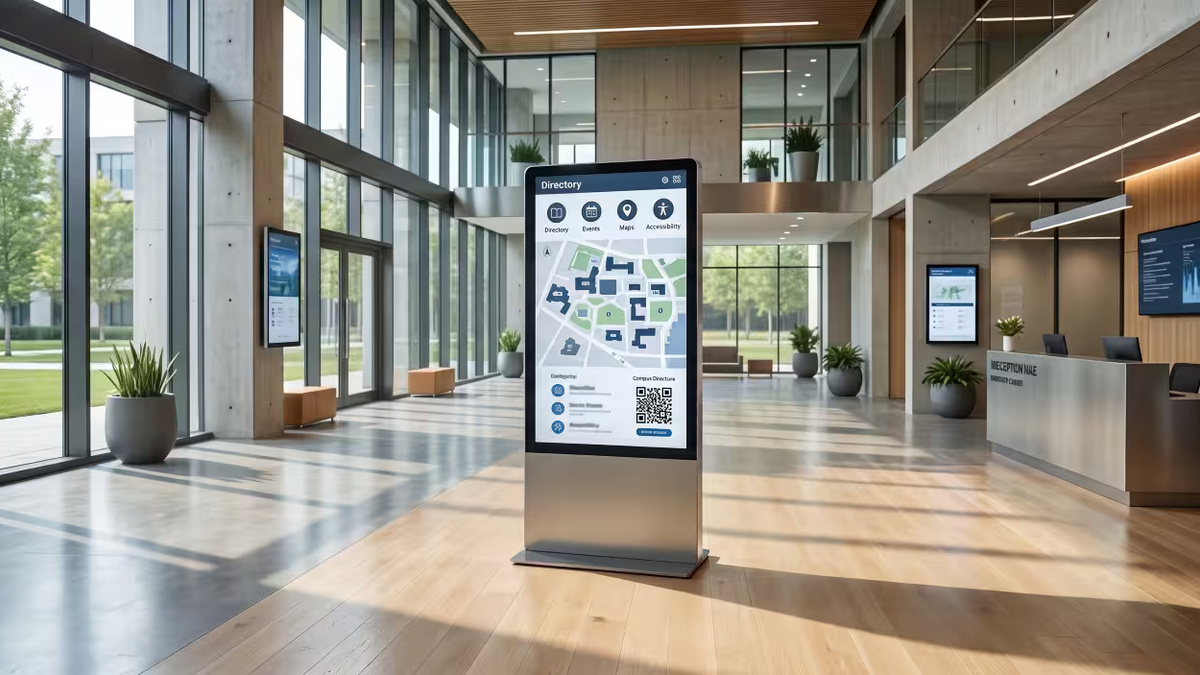
Think of it as the GPS your campus never had, or more like a small compass that’s always awake. A campus directory touchscreen is an interactive kiosk that helps everyone, students, parents, recruits, vendors, quickly locate a building, a department, or even a single classroom in seconds, instead of drifting around for twenty minutes.
The good ones do more than just point, they offer a kind of intuitive directory so users don’t feel lost. They map actual walking routes and mark accessible ways for wheelchair users, and they pull live bits like office hours or event timetables straight out of your school’s content management systems. Some setups even, like the University of the Pacific’s version, generate a QR code so a visitor can send the directions straight to their phone and keep moving instead of trying to memorize every turn, which ends up improving the whole wayfinding experience.
This is digital wayfinding doing what static signage never could: staying current without anyone reprinting a single map.
Why Digital Wayfinding and Campus Directory Touchscreens Matter in 2026
Here's the part most schools haven't clocked yet about the importance of digital directories for intuitive campus navigation. The Department of Justice finalized accessibility rules requiring public entities serving 50,000 or more people to meet web and app accessibility standards by April 2026, ensuring that digital directories are accessible to all. That rule technically hits websites and apps but it also sends a real signal about where digital accessibility expectations are moving next, even for the kiosks in your lobby.
Add in the fact that 78 percent of prospective students say their campus visit experience heavily influences whether they enroll, and the math gets simple. A confusing campus is now a recruiting liability, not just an inconvenience.
5 Campus Challenges Solved by an Interactive Campus Directory Touchscreen
Strip away the buzzwords and a campus directory touchscreen solves five very specific, very expensive headaches:
- Outdated information is the first one. A printed map stays wrong until someone reprints it, while a touchscreen updates instantly from the cloud the moment something changes.
- Front desk overload is the second. Static signage cannot answer a single question, so staff end up giving the same directions all day, every day, while a touchscreen can cut those repetitive requests by 50 to 70 percent.
- Accessibility gaps are the third, since most physical signage was never designed with visual or mobility needs in mind, whereas a good touchscreen supports screen readers, text to speech, and ADA compliant routing out of the box.
- Visitor confusion is the fourth challenge that effective digital signage can help alleviate. A static directory gives you one view and no way to search, but a touchscreen lets anyone look up a name, a department, or a room number directly.
- And then there is maintenance cost, which for static signage runs $15,000 to $40,000 a year on average, against a touchscreen's one time install and free remote updates after that.
That front desk piece matters more than people think. Housing departments that switch to interactive directories report serious drops in front desk wayfinding questions, which frees staff for actual student support instead of being a human Google Maps.
Interactive Campus Directory Touchscreen Costs: Pricing and ROI
Budget conversations kill more good ideas than bad design ever does, so let's talk real numbers.
Turnkey kiosk bundles with a 43 to 55 inch commercial touch screen usually land around $8,000 to $15,000 for one install, though that can vary. Smaller campuses often end up in the $8,000 to $20,000 overall range, not always because of the hardware alone, also the surrounding setup. Big universities that operate a multi building network may be budgeting $30,000 to $100,000, depending on how much scale they need.
Compare that to the $15,000 to $40,000 schools already spend every single year just maintaining static signage, and the payback period stops being a question of if and starts being a question of how fast.
Examples of Interactive Campus Directory Touchscreens at Leading Schools
- The University of Alabama's Culverhouse College of Business is enhancing its digital directories for improved campus navigation. runs a unified wayfinding network across more than 700 campus locations, synced automatically with the school's event calendar. Their marketing director put it simply: people use it constantly and it has made daily operations noticeably easier.
- UC Irvine's business school is implementing a new touchscreen display for better campus navigation. replaced its old printed directory of more than 200 faculty and staff offices with an interactive touchscreen that non-technical staff can update themselves with, no IT ticket required.
- Towson University took a slightly different route with a web based interactive map that includes inclusive details like all gender restrooms and lactation rooms, proof that good wayfinding is also a statement about who your campus is built for.
- And the University of the Pacific's setup, those 82 inch touchscreens in five high traffic spots, earned a CASE Circle of Excellence award and gets used 200 to 250 times a month. That's not a kiosk gathering dust. That's the infrastructure people actually rely on.
How to Choose the Best Interactive Campus Directory and Digital Wayfinding System
A few things separate a smart purchase from an expensive paperweight: a well-designed directory system can enhance campus navigation.
- Put the kiosk where people already are: lobbies, student unions, main entrances, not a quiet hallway nobody walks through.
- Make sure your internet connection is solid since real time updates depend on it.
- Choose cloud-based software so anyone on your team can make a change without calling tech support.
- And before you sign anything, ask vendors for documented third party accessibility audits. Skip that step and you're not saving money, you're borrowing legal risk from your future self.
Why Interactive Campus Directory Touchscreens Are the Future of Campus Navigation
Static signage had a good run, but it can't update itself, can't search anything, and can't tell a visitor in a wheelchair which entrance actually has a ramp. A campus directory touchscreen does all of that quietly, in the background, every single day.
Schools have rich histories that deserve to be told well, and futures that deserve to be navigated easily through effective digital directories. That's the whole idea behind what we build at Touchstone: creating effective digital signage for better navigation. If your campus is still relying on a laminated map taped to a wall, see how Touchstone's interactive displays handle wayfinding, recognition, and everything in between, or just book a demo and we'll walk you through it ourselves.
A legacy that never graduates deserves a campus that's never lost.