

A 3D hall of fame, for a school or university, is a touchscreen display where inductees, trophies, records and team histories are presented with depth, motion and rich graphics instead of flat text on a plaque. Search the phrase and you will mostly find framed memorabilia, logo signs and museum models. If you run an athletic department, an alumni office or a front office and want something people will walk up to and touch, this guide covers what a 3D digital hall of fame is, what it costs, and how to plan one that lasts.
Touchstone-dsBring School Achievements to LifeTouchstone creates customizable touchscreen Hall of Fame displays with advanced 3D graphics to help schools showcase achievements and connect their communities.Explore digital Hall of Fame
TL;DR
- A 3D digital hall of fame is interactive software on a touchscreen, not a physical 3D object. It can show trophies, banners and records with depth and animation, and you update it from the cloud.
- Touchstone’s published hardware bundles run $3,100 to $4,900 for wall mounted and $3,550 to $4,300 for floor standing, one-off. Software and specialty modules are quoted individually.
- Accessibility, clear navigation and staff training decide whether the display gets used, more than any visual effect does.
- Start with a content plan (who, what, how far back) before you choose screen size and location.
Table of Contents
- What people mean by a 3D hall of fame
- Physical 3D pieces versus a 3D digital display
- What a good 3D hall of fame includes
- Why interactivity matters more than the effects
- Plan for accessibility from day one
- Choosing screen size and location
- What it costs
- A step-by-step plan for your first 90 days
- Common mistakes to avoid
- Our perspective
- Ready to see what yours could look like
- FAQ
- Sources
What people mean by a 3D hall of fame
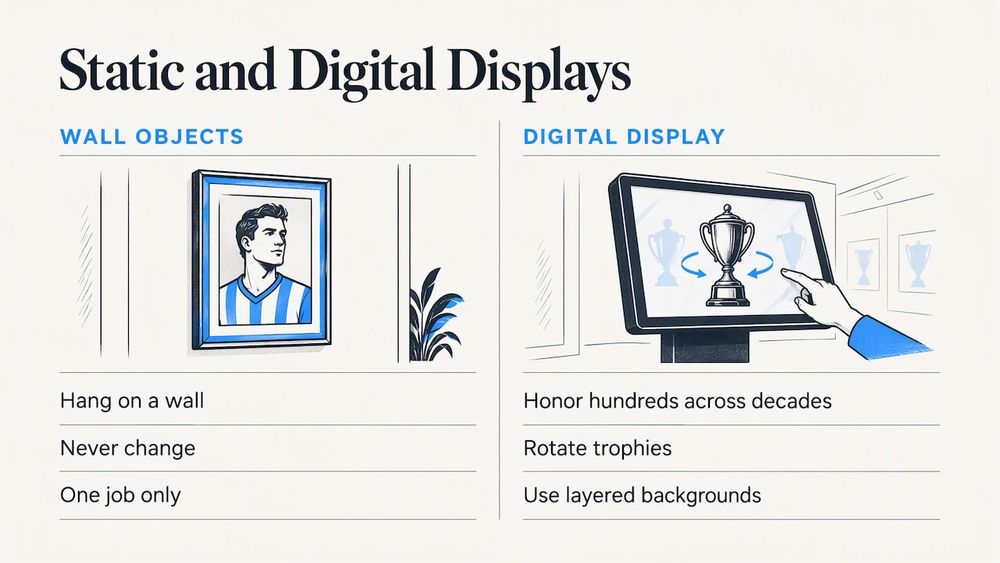
The search results for this phrase are a mixed bag: 3D-printed logo signs, framed player portraits with raised centerpieces, magnets and online 3D models of famous museums. Those are fun objects, but they do one job. They hang on a wall and never change.
Schools usually want something different. They want to honor hundreds of people, often across decades, without building a new wall every time a class is inducted. That is where a digital hall of fame comes in. The “3D” part describes how the content looks and behaves on screen: trophies you can rotate, layered backgrounds, smooth transitions and graphics that feel closer to a video game than a spreadsheet.
Touchstone Digital Solutions builds exactly this kind of display for schools and universities. Our interfaces include advanced 3D graphics and are designed by UI/UX designers with a gaming background, with Emmy-nominated visual design behind them. The goal is simple: a student who walks past should want to stop.
Physical 3D pieces versus a 3D digital display
Both have a place. A bronze plaque or a framed jersey has weight and history that a screen cannot copy. The trouble starts when the wall runs out of room, a name is misspelled, or a record falls and nobody has the budget to replace the board.
| Question | Physical wall or 3D framed pieces | Interactive 3D touchscreen |
| Adding a new inductee | New plaque or frame, lead time, cost each year | Add a profile in the cloud editor |
| Fixing an error | Remake the piece | Edit and publish |
| How much each person can show | A name, a year, a few lines | Photos, video, stats, stories, linked records |
| Searching and browsing | Walk the wall | Search by name, sport, year or team |
| Space used | Grows with every class | One screen |
| Atmosphere | Tangible, traditional | Immersive, current |
Many schools keep a few physical pieces and let the screen carry the depth. Exhibit design research points the same way. A study of interactive displays in museums found they work best as a complement to the physical artifacts around them, not a replacement, building a multi-layered learning experience. A trophy case beside a screen that tells the story behind each trophy is a good example.
What a good 3D hall of fame includes
The visual layer gets the attention, but the content structure is what makes a display worth visiting. These are the pieces schools ask us about most.
Inductee profiles
Each profile can hold a portrait, years of attendance, accomplishments, a short biography and photos or video. For athletic programs, our Digital Athletic Hall of Fame pulls inductees together with teams, seasons and championships so visitors can move between them.
Trophies and team achievements
This is where 3D graphics earn their keep. A trophy that visitors can look at from different angles, paired with the team roster and season story, beats a photo caption. Our Digital Trophy Case software is built for this.
Record boards
Records change, and nothing looks sadder than an outdated record board. A digital version updates the moment a new mark is set. See our Digital Record Boards for how that works.
Donor recognition
Universities and booster clubs often add a donor layer. Digital Donor Walls let you add names as gifts arrive, without ordering new engraved panels.
Yearbooks and archives
Old yearbooks are the richest source of hall of fame content, and they are often sitting in a closet. Professional yearbook digitization and a digital history archive turn them into searchable pages on the same screen.
Why interactivity matters more than the effects
It is tempting to judge a display by how flashy the demo looks. Research on interactive displays suggests a more useful lens.
First, social use. A common worry is that screens isolate people. Museum and education research finds the opposite when displays are well designed: interactive displays can support collaborative group work as well as individual exploration, especially when several people can touch the content at once. In a school lobby, that looks like a group of alumni at homecoming leaning over a 65 inch screen, finding their old teammates together.
Second, curiosity. Exhibit design work shows that interactive elements work best when they prompt visitors to explore before handing over static information. For a hall of fame, that means a home screen that invites a tap (a timeline, a “find your class” prompt, a sport selector) rather than a wall of text.
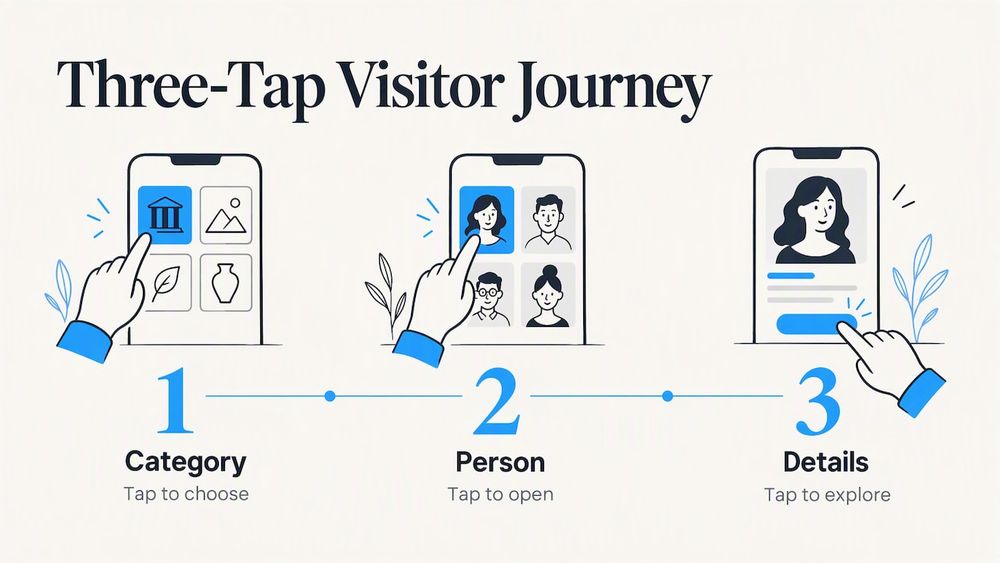
Third, simple steps. Research on digital exhibit labels found interactive displays work best with a step-action-step format, particularly for users who have trouble with complex, multi-step instructions. Translate that to your hall of fame: one tap to pick a category, one tap to pick a person, one tap to go deeper. If a first-time visitor needs instructions, the interface is too busy.
Plan for accessibility from day one
A hall of fame is for everyone who walks through your doors, including students and visitors who use wheelchairs, have low vision or are shorter than average. The Smithsonian’s guidelines for accessible exhibition design are a widely used reference. They say that for a forward approach, controls should sit between 15 and 48 inches above the floor, operate with no more than 5 pounds of force, work with one hand, and not require tight grasping or wrist twisting. The same guidance calls for at least 30 by 48 inches of clear floor space, voiceover options and high-contrast design.
What this means when you plan:
- Check the mounting height. The interactive area, not just the top of the screen, has to fall within reach. A tall display mounted high on a wall may look great and fail this test.
- Leave floor space in front. Do not tuck a display into a corner or behind a trophy case where a wheelchair cannot approach.
- Choose high-contrast color schemes. School colors are great, but check that text stays readable on top of them.
- Offer more than one way to take in content, such as captions on video and audio where appropriate.
This is guidance from a museum context, not a legal ruling for your building. Your district facilities lead or ADA coordinator is the right person to confirm what applies to your site and your state.
Touchscreen hardware is available in a wall mounted or floor standing form, which gives you options when a wall location does not work for reach range.
Choosing screen size and location
The best location is where people already gather and linger: the main lobby, outside the gym, near the trophy cases, the alumni center or the entrance to a stadium club. Hallways with fast foot traffic are poor places for a screen that rewards slow browsing.
On size, think about how many people will use it at once and how far away they will stand. Touchstone offers 55 inch, 65 inch, 75 inch and 86 inch interactive displays. As a rule of thumb, smaller screens suit a tight corridor or a single-visitor kiosk, while the larger sizes suit lobbies where groups gather. Remember the reach range above: bigger is not always better for touch.
What it costs
Budget is usually the first question, so here is what we publish. Our hardware bundles are one-off prices:
| Bundle | Price |
| Wall Mounted Touchscreen Bundle | $3,100 to $4,900, one-off |
| Floor Standing Touchscreen Bundle | $3,550 to $4,300, one-off |
The range reflects the display you choose. Our touchscreen software, the trophy case, record board, donor wall, yearbook digitization and history archive offerings do not have published prices, because scope depends on how much content you have and how custom the design is. We quote those individually.
Two things are worth asking any vendor, us included. Ask what happens after installation (ongoing fees, updates, support) and ask who builds the design. We do not charge maintenance costs, and you work directly with the founders of a family-run business, which keeps support personal.
A step-by-step plan for your first 90 days
A display is only as good as the content that goes on it. This sequence works for most schools.
- Decide the scope. Athletics only, or also academics, arts, donors and staff? You can start narrow and add later, but know where you are headed.
- Set induction criteria. Clear, written criteria and a nomination process keep the program fair and defensible. Many schools publish a nomination form with a yearly deadline, so alumni know how to put forward a name.
- Gather the raw material. Photos, yearbooks, newspaper clippings, record books and stats sheets. Start with the most recent decade, where digital files exist, and work backward.
- Digitize the old material. Yearbooks and scrapbooks may need professional scanning so that pages are searchable and legible on a large screen.
- Pick hardware and location. Measure the wall, check the reach range, confirm power and network access.
- Design for your brand. Colors, mascots, fonts and logos should look unmistakably yours. A custom design is what makes a display feel like a part of the school instead of a generic kiosk.
- Train the people who will update it. Educational research on interactive displays finds that staff who receive proper training report better results, and that an intuitive, easily updatable system turns a static plaque into something that grows with the institution. Name two people responsible for updates, not one.
- Launch with an event. Homecoming, a signing day, an induction ceremony. Let the first inductees see themselves on the screen.
For more depth, our guides cover how to implement a hall of fame and the platform options for building a virtual hall of fame. Universities may prefer the buying guide for universities, and high schools the buying guide for high schools.
Common mistakes to avoid
- Treating it as a one-time project. A hall of fame that stops updating after the launch event feels abandoned within a year. Schedule updates around the athletic seasons and the graduation calendar.
- Too many menus. If visitors need to read a screen of instructions, they leave.
- Ignoring the physical space. Glare from windows, a narrow hallway or a screen above reach range will undo great design.
- Leaving out the “why”. A name and a year is a plaque. A short story about what the person did, and what they said about the school, is a hall of fame.
- Choosing visuals over content. 3D effects get the first tap. Rich, accurate stories earn the second and third.
Our perspective
We get the same request from many athletic directors: “We want it to look like something our students would actually stop for.” That is why we build with designers from the gaming world. Students grew up with polished interfaces, and a clunky display tells them the school does not value its own history.
But the visuals are only the doorway. In our experience, the displays that become a part of school life are the ones where someone owns the content, the design matches the school’s identity and the interface is plain enough that a grandparent can use it on the first try. Recognition should feel fair and personal, and it should grow as the school does. That is why we offer cloud-based updates, why we work directly with each school on its design and why we do not charge maintenance costs. We would rather you spend your energy on the stories than on keeping a screen alive.
— Gardner Gendron
Ready to see what yours could look like
If you are weighing a 3D digital hall of fame for your school or university, start with our Digital Athletic Hall of Fame page or look at the touchscreen hardware bundles. You can also reach us through touchstone-ds.com to talk through your content, your space and a design that carries your school’s identity.
FAQ
Is a 3D hall of fame a physical object or software?
Both exist, and the search results mix them. Framed pieces with raised 3D logos and 3D-printed signs are physical decor. For schools that want to honor many people over many years, a 3D digital hall of fame is touchscreen software that presents trophies, records and profiles with depth and animation, and that you update online.
How much does a digital hall of fame cost?
Touchstone’s published hardware bundles are $3,100 to $4,900 for a wall mounted unit and $3,550 to $4,300 for a floor standing unit, one-off. Software and specialty modules such as trophy cases, record boards and donor walls are quoted individually based on scope.
Can a touchscreen hall of fame be accessible to wheelchair users?
Yes, if you plan for it. Smithsonian accessibility guidance places forward-reach controls between 15 and 48 inches above the floor and asks for 30 by 48 inches of clear floor space. Confirm the specifics for your building with your facilities lead or ADA coordinator.
Who updates the content after installation?
Your own staff can, through a cloud-based content editor, so new inductees and records go live without a new install. Training matters: research on interactive displays links proper staff training to better results, so name at least two people to own updates.
Does a digital display replace our trophy case?
Not necessarily. Exhibit research suggests screens work best alongside physical artifacts. Many schools keep the trophies and jerseys on display and use the screen to tell the story behind each one.
Sources
- Accessible Exhibition Design (Smithsonian guidelines)
- How augmented reality, textual, and collaborative scaffolds work synergistically to improve learning in a science museum
- Interactive displays and collaborative group work research (Northwestern University)
- Digital Exhibit Labels in Museums: Promoting Visitor Engagement with Cultural Artifacts
- Interactive display implementation and user training study