
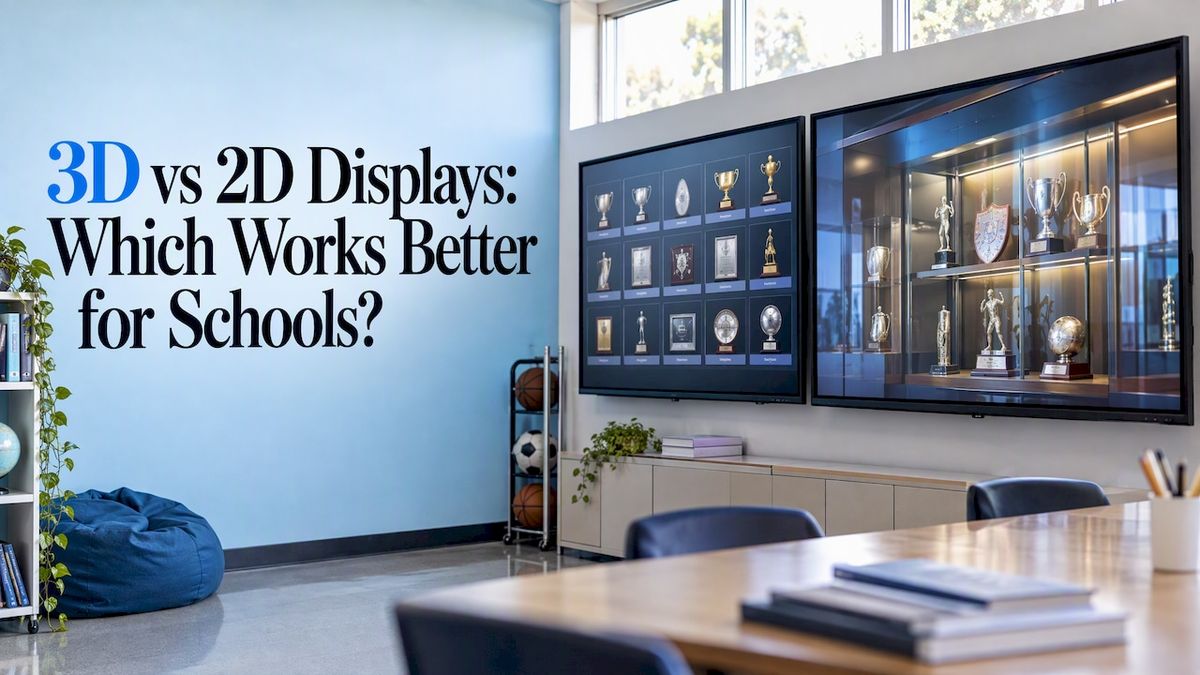
A 2D display shows a flat image with width and height. A true 3D display adds real or simulated depth, usually by sending a slightly different image to each eye. For a school, the practical answer is a blend: a screen that is physically flat (and easy to read from any angle) but runs software with 3D-rendered visuals where depth adds drama. Pure stereoscopic 3D, the kind that needs glasses, rarely earns its place on a hallway wall.
This guide explains the difference in plain terms, what the research says about accuracy and comfort, and how to choose for a Hall of Fame, trophy case, or record board.
Touchstone-dstouchstone-ds.comGive School Achievements More DimensionTouchstone creates customizable Digital Hall of Fame experiences with interactive displays that help schools celebrate achievements and connect their communities.Explore Touchstone displays
TL;DR
- A 2D display shows flat images. A 3D display creates the perception of depth, most often by presenting different images to each eye.
- For reading precise information (names, dates, numbers), research favors 2D. For atmosphere, spatial understanding, and visual impact, 3D rendering helps.
- Genuine stereoscopic 3D can cause headaches or eyestrain for some viewers, which matters on a wall used by hundreds of students a day.
- Most schools get the best result from a flat touchscreen running 3D-styled graphics: no glasses, sharp text, real depth in the design.
Table of Contents
- What is the difference between a 2D and a 3D display?
- How the main display types compare
- Which one is more realistic?
- Where 2D wins: reading and accuracy
- Where 3D wins: impact and engagement
- The comfort question with true 3D
- Choosing for your school
- Our perspective
- What this looks like with Touchstone
- Common mistakes to avoid
- FAQ
- Sources
What is the difference between a 2D and a 3D display?
The simplest test is depth. 2D images appear flat, with width and height, while 3D images or objects have depth or the illusion of it. A photo on a page is 2D. A sculpture you can walk around is 3D.
On a screen, that line gets blurry, because the glass itself is always flat. There are really two separate things people mean when they say “3D”:
- 3D graphics: content modeled in three dimensions (a rotating trophy, a virtual gym, a camera that moves through a digital hallway) and then drawn onto an ordinary flat screen. Video games and animated films work this way.
- 3D display technology: hardware that actually delivers different images to your two eyes so your brain perceives true depth. Stereoscopic displays present offset images separately to the left and right eyes, and the brain combines them into the perception of depth. These are often just called 3D displays or stereo displays.
That second effect relies on binocular disparity. The human stereoscopic mechanism uses the angular difference between the two eyes’ views as its cue for depth. Your eyes are a few inches apart, so each sees the world from a slightly different spot, and your brain does the rest.
This distinction answers most of the confusion behind the 2D vs 3D question. When a school says it wants a “3D” display, it nearly always means 3D graphics on a flat screen. When an engineer says “3D display,” they usually mean glasses, lenticular panels, volumetric or light field hardware.
How the main display types compare
| Standard 2D display | 2D screen with 3D graphics | Stereoscopic 3D display | |
| What you see | Flat images and text | Flat screen showing rendered depth, lighting, and camera movement | Separate image per eye, true depth perception |
| Glasses needed | No | No | Often yes, or a fixed viewing position |
| Text sharpness | Highest | High | Often lower, since spatial resolution is shared between views |
| Viewing comfort | Easy for nearly everyone | Easy for nearly everyone | Can cause headaches or eyestrain for some |
| Best use | Records, rosters, documents, timelines | Hall of Fame, trophy cases, showpiece displays | Specialized training, simulation, research |
| Group viewing | Great from wide angles | Great | Harder; viewing angle matters |
The middle column is where most school recognition displays live.
Which one is more realistic?
Stereoscopic 3D is closer to how we see the physical world. Because our retinal images are perspective projections of the world, 3D displays may be more ecologically plausible than 2D displays, but that realism has limits in practice.
Research on visualization tasks found that 3D displays can work for approximate navigation and relative positioning when cues such as shadows are present, but are not effective for precise navigation and positioning except in specific circumstances. In other words, 3D gives you a feel for a space but is a poor ruler.
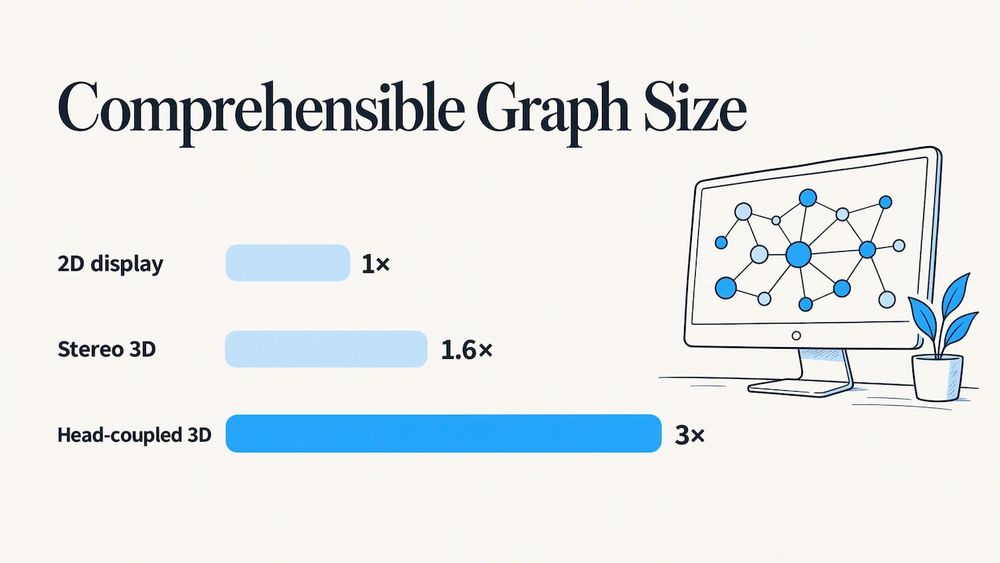
There is also a case where 3D wins on volume of information. In a study on network graphs, 3D stereo viewing increased comprehensible graph size by a factor of 1.6, and adding head-coupled perspective allowed three times as much information to be perceived as a 2D display. That is a specialist setup with head tracking, not something you would hang in a school lobby, but it shows 3D has real strengths for complex spatial data.
The same 2006 research also found that combined displays performed as well as or better than strict 2D or 3D displays, inspired higher confidence, and allowed natural, integrated navigation. That finding is the closest thing to a rule of thumb for schools: mix the two.
Where 2D wins: reading and accuracy
A recognition display exists so a visitor can find a name, a year, a record, and read a story. That is a reading and lookup job, and flat presentation is strong at it.
The evidence on charts is consistent:
- In a psychophysical study of 57 undergraduates, 2D bar charts had an accuracy advantage of approximately 10% over 3D bar charts.
- A 2009 study found that 2D graphs led to better comprehension, particularly for complex information, and that 3D rendering may negatively affect graph comprehension.
- A 1998 study found that adding 3D perspective depth cues lowered accuracy, though the effect of a bar’s height relative to nearby graphical elements was about one order of magnitude larger. The authors also suggested warnings about 3D shading may be overstated.
The takeaway for a record board: if a visitor needs to compare the 100-meter times of four decades of sprinters, show those numbers in clean, flat layouts. Do not tilt the bars in perspective for style.
Text has its own nuance. A 2010 study found that “Billboard” text styles significantly improved reading speed and accuracy when integrated with 3D graphics compared to plain text styles. So if you do place words over a 3D scene, give them a solid backing or outline rather than letting them float over busy imagery.
Where 3D wins: impact and engagement
Nobody walks up to a Hall of Fame to do math. They come to feel something: pride, nostalgia, connection. Depth, lighting, and motion help with that. A trophy that rotates under a spotlight, a virtual trophy case you can “walk” through, or a camera sweep across a stadium of banners gets people to stop and touch the screen.
There is also evidence that dimensional, embodied experiences help people learn. A 2009 study of high school students found that embodied, collaborative virtual environments such as the SMALLab platform can produce geology learning gains that exceed those from traditional hands-on classroom procedures. A companion paper reported that mixed-reality learning was viable in mainstream high school classrooms, with significant learning gains when the technology was co-designed with educators. That work involved whole-body interaction in a classroom, not a hallway display, so treat it as a sign that spatial, interactive media can engage students rather than as proof for any specific product.
For recognition, 3D is best used for:
- Trophy and artifact showcases, where the object itself has shape worth showing.
- Entry screens and attract loops that draw people in from across the hall.
- Transitions and navigation, where a sense of space helps people orient themselves.
- Branding, such as mascots, crests, and colors rendered with depth.
If you want a deeper look at what this means for school recognition specifically, our piece on what a 3D Hall of Fame means for a school display goes into it.
The comfort question with true 3D
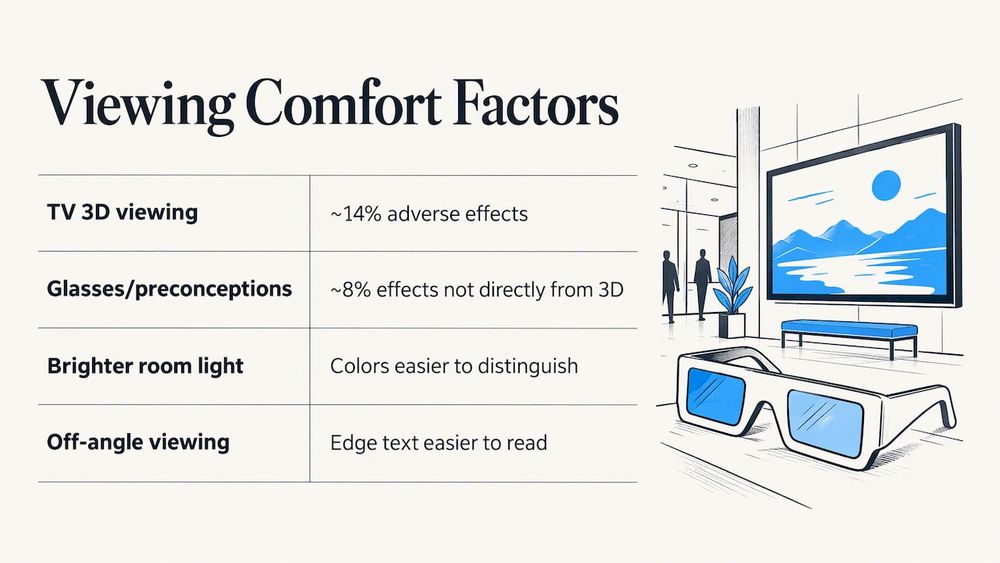
If you are considering stereoscopic hardware, take comfort seriously. In a lab-based study of 433 viewers aged 4 to 82, around 14% reported adverse effects, mainly headache and eyestrain, from viewing stereoscopic 3D. The same study found that about 8% reported adverse effects not directly due to the 3D itself, but to the glasses or negative preconceptions.
Those numbers come from television viewing, so they do not map exactly to a school wall. They do point to a practical problem. A school display is used by a mixed crowd: kindergartners, parents, grandparents, and alumni of every age, many for a few seconds at a time and many with glasses already on their faces. Asking all of them to wear extra glasses, or to stand in one spot, works against the goal.
Viewing conditions matter for flat screens too. A human factors evaluation of large displays found no differences in eye movement metrics across displays, while participants rated colors easier to distinguish in brighter room light and edge text easier to read off-angle. That was an aviation cockpit study, but the principle holds for a school lobby with windows: think about glare and angle, not only the technology.
Choosing for your school
Use the job the display does to decide, not the buzzword.
Start with what visitors need to do
- Find a person or record quickly: favor 2D layouts with search, filters, and large readable type.
- Browse and feel the legacy: favor 3D-styled scenes and motion, with a flat details panel for the facts.
- Compare numbers across years: stay flat and simple.
- Explore a place or object: use 3D visuals, but keep controls obvious.
Then match the hardware
A flat commercial touchscreen is the safe default. It is comfortable for everyone, readable from wide angles, and it supports both flat and 3D-rendered software. Size depends on the room and viewing distance. Our guide on choosing the right interactive wall size for a university walks through that thinking, and the same logic applies to high schools. Our hardware ranges from 55-inch and 65-inch panels for corridors and small lobbies, through 75-inch and 86-inch displays, up to a 100-inch 4K touchscreen for a gym or atrium.
Plan the content mix
A good rule is to let 3D set the mood and 2D carry the information. A few examples:
- Digital Hall of Fame: a 3D-styled entry scene with banners and trophies, then flat profile pages with photo, bio, and accomplishments.
- Record boards: flat, high-contrast tables, with a 3D highlight only for the newest record.
- Donor walls: a dimensional background, with names in crisp flat type that is easy to scan.
- Timelines: simple, readable flat layouts. Our guide to planning an interactive timeline display covers how.
For more ideas on how classrooms and campuses put touch displays to work, see how schools use interactive touchwalls.
Our perspective
We build digital recognition displays for schools and universities, and we get this question often, usually phrased as “should it be 3D?” Our answer is that you should never make a visitor work to read a name.
The founders of Touchstone come from a background where interface design is the whole game. Our team includes gaming industry UI/UX designers, and our visuals have been Emmy-nominated. That experience taught us that depth is a tool for guiding attention, not a goal in itself. A rotating trophy draws a student across the hall. A clean, flat profile page keeps a parent reading about their daughter’s state title for two minutes.
So we design in both. The 3D graphics do the welcoming, and the 2D layouts do the telling. Everything is branded to your school, so the display feels like your hallway and not like a template. We would rather give you a screen that every grandparent and kindergartner can use comfortably than a headline-grabbing gimmick that needs instructions.
— Gardner Gendron
What this looks like with Touchstone
If you are planning a recognition space, we can help you decide where depth belongs and where clarity matters. Our wall-mounted touchscreen bundles are published at $3,100 to $4,900 one-off, and our floor-standing bundles at $3,550 to $4,300 one-off. Both pair hardware with software. You can see the options on our touchscreen hardware page, or explore the Digital Athletic Hall of Fame to see how a flat and 3D design combine for sports programs.
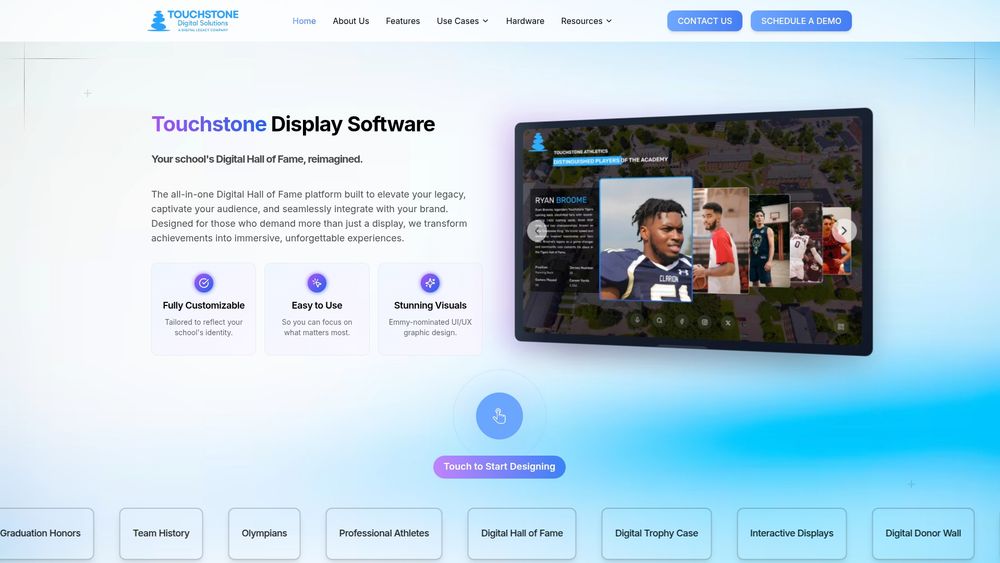
If you already have a display and want better content on it, our touchscreen software is cloud-managed, so updates go live in real time. You can also start from the Touchstone home page and tell us what you want to celebrate.
Common mistakes to avoid
- Choosing stereoscopic 3D for novelty. If it needs glasses or a sweet spot, most visitors will walk past.
- Using perspective charts for stats. Keep records and rankings flat, given the accuracy research above.
- Putting text over busy 3D scenes without a backing panel or outline.
- Ignoring glare. Test the screen at the brightest time of day, from the angles people really stand at.
- Forgetting the update plan. A beautiful display that is stale in a year loses its audience. Choose software that lets staff add new inductees and records easily.
FAQ
Do our eyes see in 3D or 2D?
We see in 3D. Each eye gets a slightly different view, and the brain combines them, using the angular difference between the views as a cue for depth. That is the same principle stereoscopic 3D displays copy.
What is a 3D display called?
Stereoscopic displays are commonly called stereo displays, stereo 3D displays, stereoscopic 3D displays, or simply 3D displays. They show offset images to the left and right eyes so the brain perceives depth.
How can I tell whether something is 2D or 3D?
Look for depth. A 2D image is flat, with only width and height. A 3D image or object has depth, or a convincing illusion of it, such as shading, perspective, and parallax as you move.
Is 3D better than 2D for a school Hall of Fame?
Not on its own. Flat layouts are better for reading names, dates, and records, and 3D-styled visuals are better for drawing people in and conveying atmosphere. Combining them gives the best result.
Do 3D displays cause eyestrain?
Some do. A study of 433 viewers found around 14% reported adverse effects such as headache and eyestrain from stereoscopic 3D. A flat screen running 3D-rendered graphics avoids that issue because it does not require separate images for each eye.
Sources
- What is 3D (three dimensions or three-dimensional)?
- 3D display
- Three-dimensional displays and stereo vision
- Visualization Task Performance with 2D, 3D, and Combination Displays
- Viewing a Graph in a Virtual Reality Display is Three Times as Good as a 2D Diagram
- Just noticeable differences in 2D and 3D bar charts
- Extraneous information and graph comprehension
- Reading Bar Graphs: Effects of Extraneous Depth Cues and Graphical Context
- Integrating Text with Video and 3D Graphics
- User experience while viewing stereoscopic 3D television
- Human Factors Evaluation of Large Displays in the Air Traffic Control Tower
- SMALLab: Virtual Geology Studies Using Embodied Learning
- Teaching and Learning in the Mixed-Reality Science Classroom